Photo Frames & Effects Premium1.5
Publisher Description
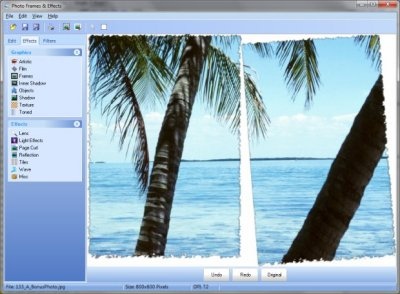
Photo Frame & Effects Premium is a digital photo tool that allows you to add frames, borders & filter effects to your digital photos. The program easy-to-use interface allows you to alter your images fast and easy without the need to read trough complicated documents.
Photo Frame & Effects can also do auto cropping, resizing, rotating, and remove red-eyes on your photos. There are also lot of special effects and possibility to adjust temperature, contrast and more. The program comes with many different frames and effects and support for additional add-ons to support more frames and effects to be added to the software.
Features
* Easy-to-use interface.
* Over 270 frames and effects (in the registered version)
* Ability to use you own custom frames from png-files
* Supports file formats like: BMP, PSD, DCM, GIF, JPG, JP2, J2K, PCX, PNG, TGA and more.
* Support Camera RAW formats like: CRW, CR2, NEF, RAW, RAF, X3F, SRF, MRW, DCR
* Import images from Scanner or Digital Camera.
* Add clip arts to your photos.
* Add text to your photos.
* Easily add: Borders, Frames and other effects.
* Resize, Crop, Rotate and Flip images.
* Remove Red-Eye from pictures.
* Adjust Color Balance, Contrast, Brightness and Gamma Correction.
* Filter effects: Motion Blur, Sepia, Emboss, Edge Detect and more.
* Special effects: Lens, Lights Effects, Page Curl, Reflection, Tiles and more.
* Print to photo paper directly from the program.
About Photo Frames & Effects Premium
This Editors program is available in English. It was last updated on 29 September, 2026. Photo Frames & Effects Premium is compatible with the following operating systems: Windows.
The company that develops Photo Frames & Effects Premium is Big Star Software. The latest version released by its developer is 1.5. This version was rated by 1 users of our site and has an average rating of 5.0.
The download we have available for Photo Frames & Effects Premium has a file size of 28.3 MB. Just click the green Download button above to start the downloading process. The program is listed on our website since 2014-06-15 and was downloaded 23 times. We have already checked if the download link is safe, however for your own protection we recommend that you scan the downloaded software with your antivirus. Your antivirus may detect the Photo Frames & Effects Premium as malware if the download link is broken.
How to install Photo Frames & Effects Premium on your Windows device:
- Click on the Download button on our website. This will start the download from the website of the developer.
- Once the Photo Frames & Effects Premium is downloaded click on it to start the setup process (assuming you are on a desktop computer).
- When the installation is finished you should be able to see and run the program.
Program Details
System requirements
Download information
Pricing
Version History
version 1.5
posted on 2014-06-15
Added: Possability to use custom frames (png)
Added: Default print layout (portrait or landscape) depending on image size
Fixed: Did not always remember last saved image type
Fixed: Did not clear the last filename in the save dialog after scaning a picture
Fixed: Windows 8 compatibility
Fixed: A bug that you could not get out of full screen mode
